Using the internet should feel safe, not confusing or stressful. But today, scams, data breaches, and identity theft are more common than ever.
The good news is that you don't need to be a technology expert to protect yourself.
This guide walks you through simple steps you can take to keep your personal information, finances, and family safe.
Start Here: 4 Easy Ways to Protect Yourself
If you only do a few things, start with these:
- Use a different password for each account
- Turn on extra security (called "two-factor authentication")
- Do not click links in unexpected emails or texts
- Keep your phone and computer updated
These steps alone can stop many common scams.
What Is "Two-Factor Authentication"?
You may have seen this before without realizing it.
Two-factor authentication (often called "2FA") is when a website asks for:
- Your password, and
- A code sent to your phone or email
For example, when you log into your bank account and receive a text message with a code to enter.
Why this helps: Even if someone steals your password, they cannot access your account without your phone.
Consider turning on two-factor authentication for:
- Email accounts
- Banking apps
- Social media
Look for settings labeled "Security," "Login Verification," or "Two-Step Verification."
How to Spot a Scam
Scammers often pretend to be:
- Your bank
- A delivery company
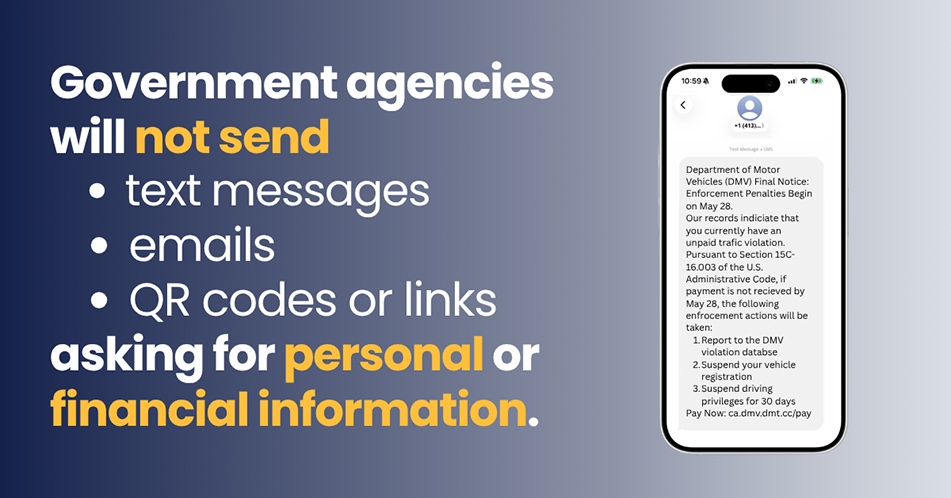
- A government agency like the DMV
They may send messages such as:
- "Your package is delayed! Click here"
- "Your account has been locked"
- "You owe money…pay now"
Warning signs include:
- Urgent or threatening language
- Links you were not expecting
- Misspelled words or unusual email addresses
What to do:
- Do not click the link
- Go directly to the company's official website
- Call the company using a trusted phone number
How to Recognize Official Government Communication
Scammers sometimes pretend to be government agencies to gain your trust.
Here are a few ways to tell what is legitimate:
- Official government websites usually end in ".gov", ".ca.gov", or ".edu"
- Some state elected officials and legislative offices may use official domains, such as .asmdc.org or .asmrc.org.
- Be cautious of websites that look similar but use slightly different spellings or extra words
- Government agencies typically do not ask for sensitive personal information by email or text message
- Important notices from government agencies are often sent by mail, especially when they involve benefits, taxes, or legal matters
If you are unsure whether a message is real, do not respond directly. Instead, visit the agency's official website or contact them using a verified phone number.
Protect Your Financial Information
Your financial accounts are a common target.
Three simple steps to protect yourself:
- Check your credit report: You are entitled to a free report each year. Review it for unfamiliar accounts or activity.
- Place a fraud alert: This tells lenders to take extra steps to verify your identity before opening new accounts.
- Freeze your credit: This prevents anyone from opening new accounts in your name unless you unlock your credit. A credit freeze is free and can be turned on or off when needed.
Protect Your Child's Identity
Children can also be victims of identity theft, and it may go unnoticed for years.
Watch for:
- Bills or credit offers in your child's name
- Calls about accounts your child does not have
To help protect your child:
- Only share their Social Security number when necessary
- Ask how their information will be stored and protected
- Keep important documents in a secure place
Avoid Public Wi-Fi for Sensitive Information
Free Wi-Fi in public places can be convenient, but it is not always secure.
Avoid logging into:
- Bank accounts
- Shopping sites
If you must use public Wi-Fi, avoid entering personal or financial information.
What to Do If You Think You've Been Scammed
Acting quickly can help reduce the impact.
- Step 1: Secure your accounts
Change your passwords immediately. - Step 2: Contact your bank or credit card company
Report any suspicious charges. - Step 3: Place a fraud alert or freeze your credit
- Step 4: Report identity theft
You can access step-by-step recovery resources at identitytheft.gov.
Here to Help
Cybersecurity starts with awareness. By taking a few simple steps, you can better protect yourself and your loved ones from fraud and identity theft.
If you have questions or need help accessing resources, my office is here to assist you.
Contact my office for assistance.